The BTR renewal notice is a courtesy reminder to renew before the expiration date to avoid penalties. Per City of Doral Ordinance No. 2013-24.
Pursuant to section 41-79 - Penalty for late payment:
*Any person failing to timely apply for the annual renewal of a business tax under this article may be issued a tax receipt only upon payment of a delinquency penalty of ten percent for the month of October or portion thereof and an additional five percent for each month of delinquency thereafter or portion thereof until paid. Payments must be received by the city prior to the first day of each penalty month to avoid additional penalties; however, the total delinquency penalty shall not exceed 25 percent of the business tax amount.
Pursuant to F.S. § 205.053 the city will assess an additional penalty of $100.00 if the business tax remains unpaid for 150 days after the initial notice of tax due. For each month after 150 days, an additional $25.00 dollar per month shall be assessed up to a maximum of $250.00*
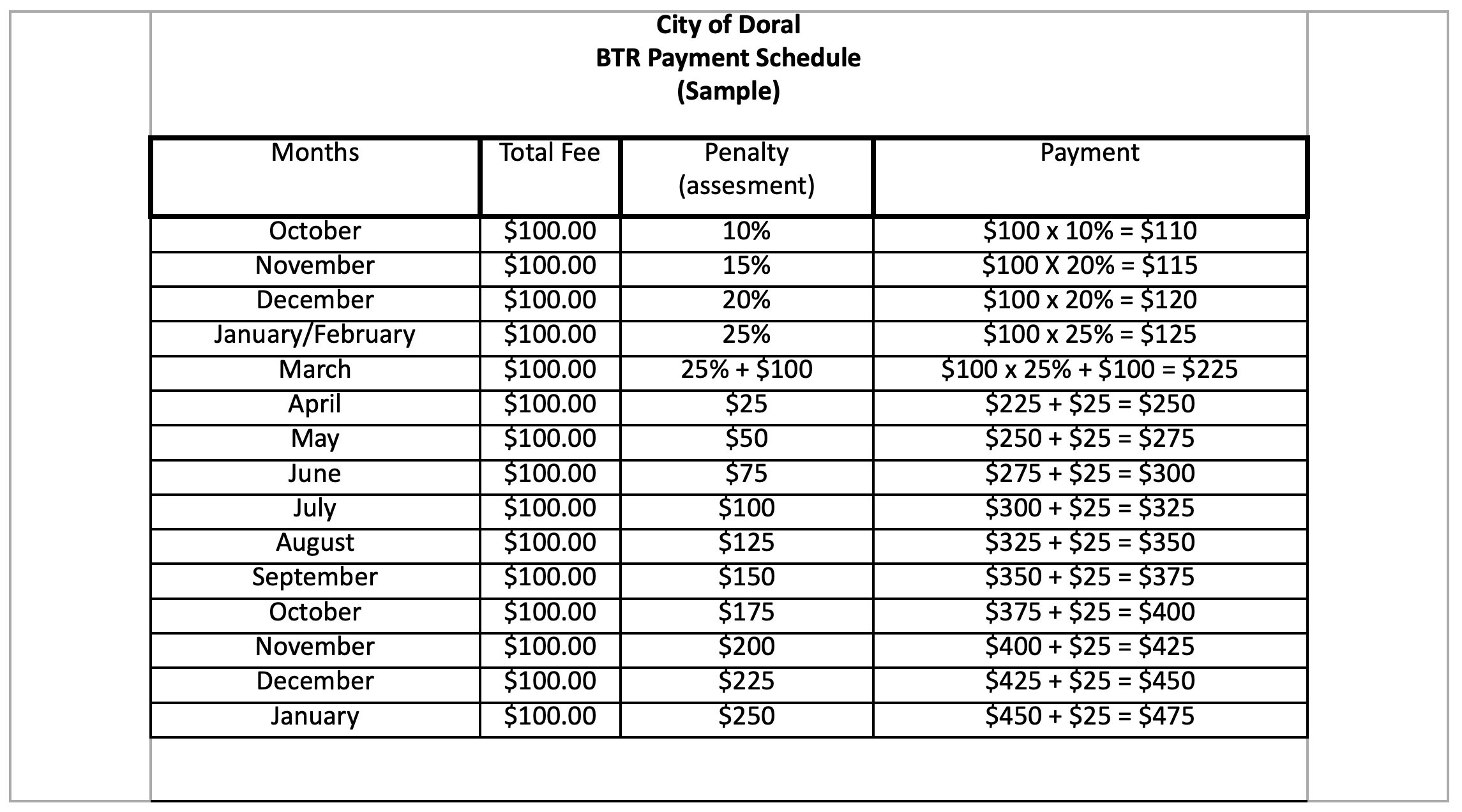
Local business taxes (formerly known as occupational licenses) vary depending on the nature of business. A receipt is required for each place of business and for each separate classification at the same location.
A business located within the City of Doral is required to obtain both a city receipt and a County receipt.
- Local Business Tax Receipts are issue for one year, beginning October 1 and expiring on September 30 of each year.
- The Local Business Tax Receipt and Certificate of Use must be displayed conspicuously at your place of business and in such a manner as to be open to the view of the public and subject to inspection by all duly authorized City of Doral officers.
- The Business Licensing Divison must be notified in writing regarding any changes to the following: business name or ownership, location, number of employees, equipment, machines or any other contingency.
- If the business ceases operation, the owner must return the Local Business Tax Receipt to the Occupational License office.
Some Local Business Tax Categories have specific additional requirements. Some applicants are eligible for exemptions.
How to Apply
Step 1. You must receive approval for business use in requested location:
Please email Licensing Division btrlicensing@cityofdoral.com, we will inform you if your use requires a Planning and Zoning approval. If so you will be provided with the Preliminary Zoning Verification Form and steps to follow to receive approval.
Once approval from the City of Doral has been obtained, the licensing division will provided you with the required documents to proceed with step 2.
Step 2. The Department of Environmental Resource Management (DERM) approval as well as fire inspection approval (you may not proceed until directed by the licensing division)
Obtain DERM:
Miami-Dade Department of Regulatory and Economic Resources
Obtain Fire Inspection Report:
Fire Inspections
Once above requirements have been met (DERM, fire) and any other approvals (example building permits and state licenses), you are ready to proceed to step 3.
Step 3. Create account and apply online on our portal:
Please be advised that you must receive Derm and fire inspection report before submitting your paperwork to the city online. We will not accept your applications if these conditions have not been met.
City of Doral CSS Portal
- Once account has been created please apply for your license
- Under “Apply” tab please look under “Licenses” row and at the bottom click “All”
- Once page has loaded please click on your corresponding application (please look for processes under BTR)
To apply you must have all below requirements met!
- DERM Approval
- Fire Inspection Approval
- Corporate documents from Tallahassee. (Articles of Incorporation)
- Document showing the Federal Employer Id from the Internal Revenue Service (IRS).
- Fictitious Name (DBA) Registration from Tallahassee, if applicable.
- Executed Lease Agreement or Sublease for proposed location. Copy of DEED required (if owner).
- State license(s) (if applicable).
- Copy of Certificate of Occupancy issued by City of Doral Building Department (if applicable).
If business is home based, please contact btrlicensing@cityofdoral.com to receive the steps to apply.
Local business taxes (formerly known as occupational licenses) vary depending on the nature of business. A receipt is required for each place of business and for each separate classification at the same location.
A business located within the City of Doral is required to obtain both a city receipt and a County receipt.
- Local Business Tax Receipts are issue for one year, beginning October 1 and expiring on September 30 of each year.
- The Local Business Tax Receipt and Certificate of Use must be displayed conspicuously at your place of business and in such a manner as to be open to the view of the public and subject to inspection by all duly authorized City of Doral officers.
- The Business Licensing Divison must be notified in writing regarding any changes to the following: business name or ownership, location, number of employees, equipment, machines or any other contingency.
- If the business ceases operation, the owner must return the Local Business Tax Receipt to the Occupational License office.
Some Local Business Tax Categories have specific additional requirements. Some applicants are eligible for exemptions.
How to Apply
Step 1. You must receive approval for business use in requested location:
Please email Licensing Division btrlicensing@cityofdoral.com, we will inform you if your use requires a Planning and Zoning approval. If so you will be provided with the Preliminary Zoning Verification Form and steps to follow to receive approval.
Once approval from the City of Doral has been obtained, the licensing division will provided you with the required documents to proceed with step 2.
Step 2. The Department of Environmental Resource Management (DERM) approval as well as fire inspection approval (you may not proceed until directed by the licensing division)
Obtain DERM:
Miami-Dade Department of Regulatory and Economic Resources
Obtain Fire Inspection Report:
Fire Inspections
Once above requirements have been met (DERM, fire) and any other approvals (example building permits and state licenses), you are ready to proceed to step 3.
Step 3. Create account and apply online on our portal:
Please be advised that you must receive Derm and fire inspection report before submitting your paperwork to the city online. We will not accept your applications if these conditions have not been met.
City of Doral CSS Portal
- Once account has been created please apply for your license
- Under “Apply” tab please look under “Licenses” row and at the bottom click “All”
- Once page has loaded please click on your corresponding application (please look for processes under BTR)
To apply you must have all below requirements met!
- DERM Approval
- Fire Inspection Approval
- Corporate documents from Tallahassee. (Articles of Incorporation)
- Document showing the Federal Employer Id from the Internal Revenue Service (IRS).
- Fictitious Name (DBA) Registration from Tallahassee, if applicable.
- Executed Lease Agreement or Sublease for proposed location. Copy of DEED required (if owner).
- State license(s) (if applicable).
- Copy of Certificate of Occupancy issued by City of Doral Building Department (if applicable).
If business is home based, please contact btrlicensing@cityofdoral.com to receive the steps to apply.
Instructions on how to Create an Account
CSS Portal
Use the link above to create an account.
Please make sure you are using google chrome and that your username is not your email.
Reminder: This will be the account the customer will use from now on to renew online and make any updates.
The email you use(d) to create your account must match the email the City of Doral has on file. To update this information please contact us at btrlicensing@cityofdoral.com
Please follow the steps below on how to create your account and how to pay once your account has been created.
On the right-hand corner of the page, you will find a drop-down menu.
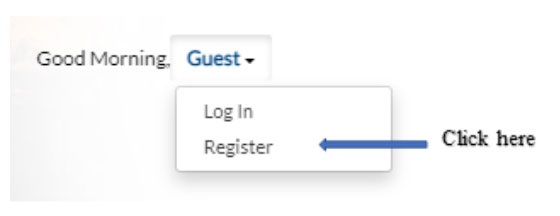
Step 1.
Please provide your email address and follow instructions sent by the system to your email.
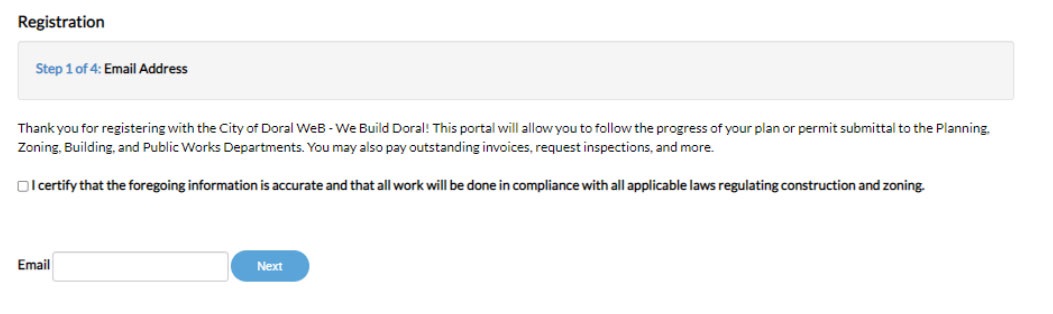
Step 2.
Create a username and password. From here, you will move to a new page for step 3 and step 4, to add your personal and address information. Once all fields have been filled out your portal will be created. You can now proceed with paying/applying for your Local Business Tax Receipt.
Once logged in, look for the tab “My Work”. Then click on the license number (first tab to the left)
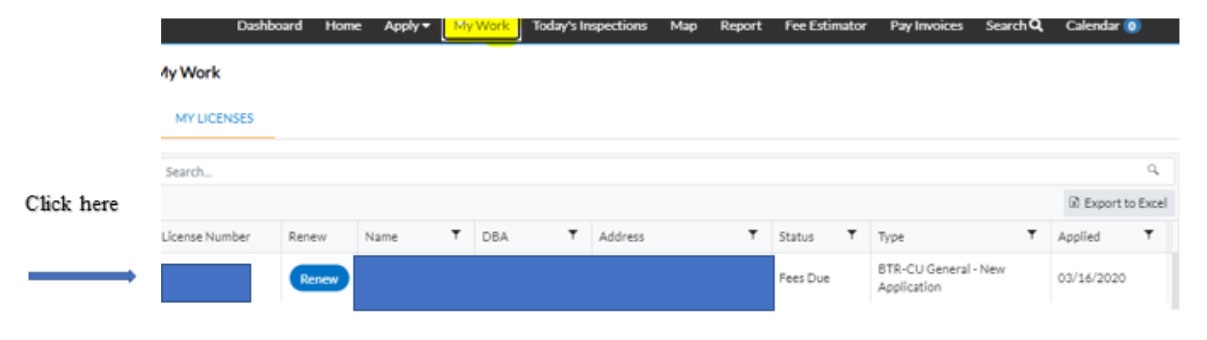
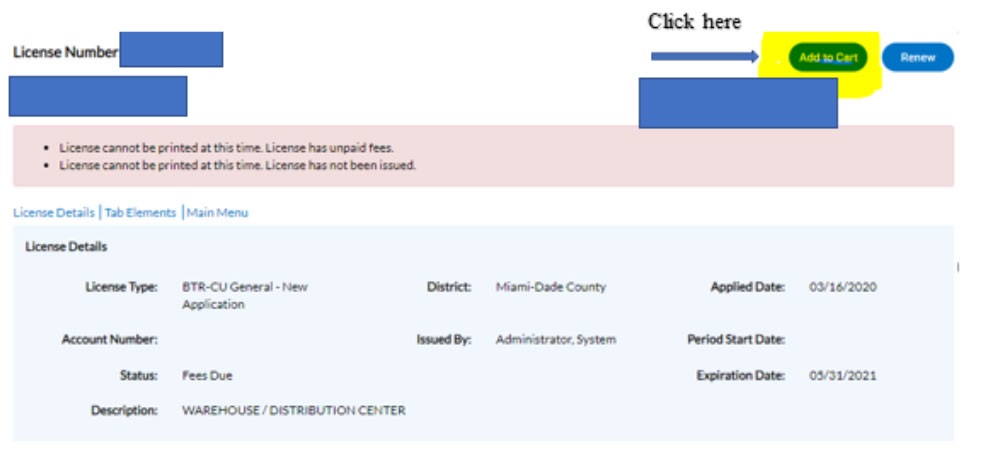
A new page will open, click on the “Add to Cart” button.
After you add to cart, a new page will open (see below). Please click on the “Check Out” button
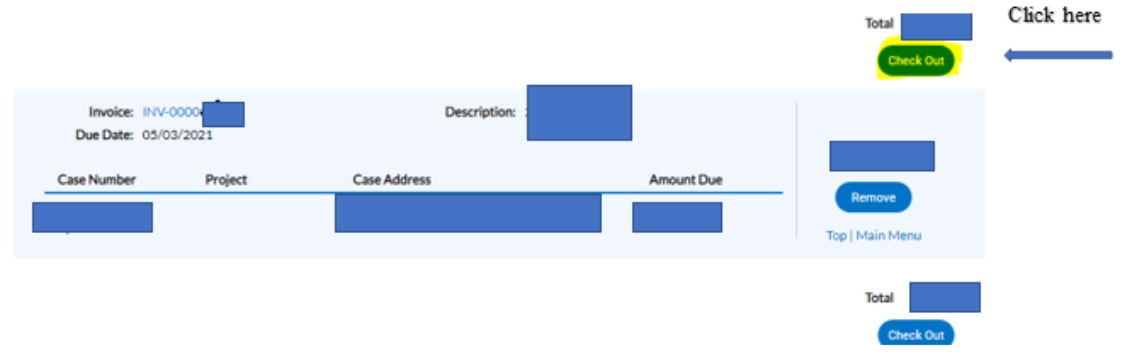
On the checkout page, please follow instructions to pay. Send us proof of payment. Once we inform you that your license has been issued, you can print your Business Tax Receipt by clicking on the printer icon  located on the right-hand corner of the page.
If you have any questions or need assistance,
please contact us at 305-593-6631 or at btrlicensing@cityofdoral.com
Respectfully,
City of Doral Licensing Division
A Local business tax Receipt vary depending on the nature of business. A receipt is required for each place of business and for each separate classification at the same location.
A business located within the City of Doral is required to obtain both a city receipt and a County receipt.
- Local Business Tax Receipts are issue for one year, beginning October 1 and expiring on September 30 of each year.
- The Local Business Tax Receipt and Certificate of Use must be displayed conspicuously at your place of business and in such a manner as to be open to the view of the public and subject to inspection by all duly authorized City of Doral officers.
- The Doral Licensing Division must be notified in writing regarding any changes to the following: business name or ownership, location, number of employees, equipment, machines or any other contingency. Doral Licensing Division
- If the business ceases operation, the owner must notify the Doral Licensing Division in writing. Please email us at BTRlicensing@cityofdoral.com.
How to Apply
To renew your BTR number, please contact the Licensing Division btrlicensing@cityofdoral.com so you may be provided with our new online payment portal.
Please be advised that you must obtain DERM approval and provide proof of Fire Inspection Report before submitting your application to the city. We will not accept your applications until these conditions have been met.
Step 1. You must receive approval for business use in requested location:
- Please email the Licensing Division btrlicensing@cityofdoral.com, they will inform you if your use requires a Planning and Zoning approval. If so you will be provided with the Preliminary Zoning Verification Form and steps to follow to receive approval.
Once approval from the City of Doral has been obtained, the licensing division will provided you with the required documents to proceed with step 2.
Step 2. The Department of Environmental Resource Management (DERM) approval as well as Fire Inspection approval (you may not proceed until directed by the licensing division)
Obtain DERM:
DERM Portal
Obtain Fire Inspection Report:
Fire Inspections
Once above requirements have been met (DERM, fire) and any other approvals (example building permits and state licenses), you are ready to proceed to step 3.
Step 3. Create account and apply online on our portal:
Citizen Self-Service Portal
Once account has been created please apply for your license
Under “Apply” tab please look under “Licenses” row and at the bottom click “All”
Once page has loaded please click on your corresponding application (please look for processes under BTR)
To apply you must have all below requirements met.
- DERM Approval
- Fire Inspection Approval
- Corporate documents from Tallahassee. (Articles of Incorporation)
- Document showing the Federal Employer Id from the Internal Revenue Service (IRS).
- Fictitious Name (DBA) Registration from Tallahassee, if applicable.
- Executed Lease Agreement or Sublease for proposed location. Copy of DEED required (if owner).
- State license(s) (if applicable).
- Copy of Certificate of Occupancy issued by City of Doral Building Department (if applicable).
If business is home based, please contact the the Licensing Division, btrlicensing@cityofdoral.com.
Contact information
Kenia Palau
Chief Licensing Officer
305-593-6725 Ext 3009
kenia.palau@cityofdoral.com
btrlicensing@cityofdoral.com
The Licensing Division
Direct Line: 305-593-6631
Fax: 305-593-6768
btrlicensing@cityofdoral.com
Effective October 14th, 2009, buyers of foreclosed properties in the City of Doral will get some protection against unexpected repairs or other deficiencies of the property under an ordinance adopted by the City Council on October 14th, 2009.
Ordinance No. 2009-15
Ordinance No. 2009-15 applies to all residential properties in the City of Doral which are acquired through a Certificate of Title (Foreclosures and Judgments), in accordance with Chapter 45, Florida Statutes. Residential properties affected include single-family homes, condominiums, townhouses and duplexes.
The new CU includes the preparation of a disclosure of findings report, which identifies building or zoning code violations for such properties and contains a good faith estimate of the cost to remedy any deficiencies. This report must be completed by an architect or professional engineer licensed and registered in the State of Florida.
Failure to obtain the required CU will result in penalties as provided in Chapter 8CC of the County code.
Filing Documents
CU Application Process(PDF, 55KB)
Ord No 2009 -15 Amending the Land Development Code(PDF, 194KB)
Disclosure of Findings Report(PDF, 304KB)
Ord No 2009 -15 Frequent Questions & Answers(PDF, 73KB)